Give it a repo and task
For example: “Find where login errors are handled.” Git history can help prioritize recent changes.
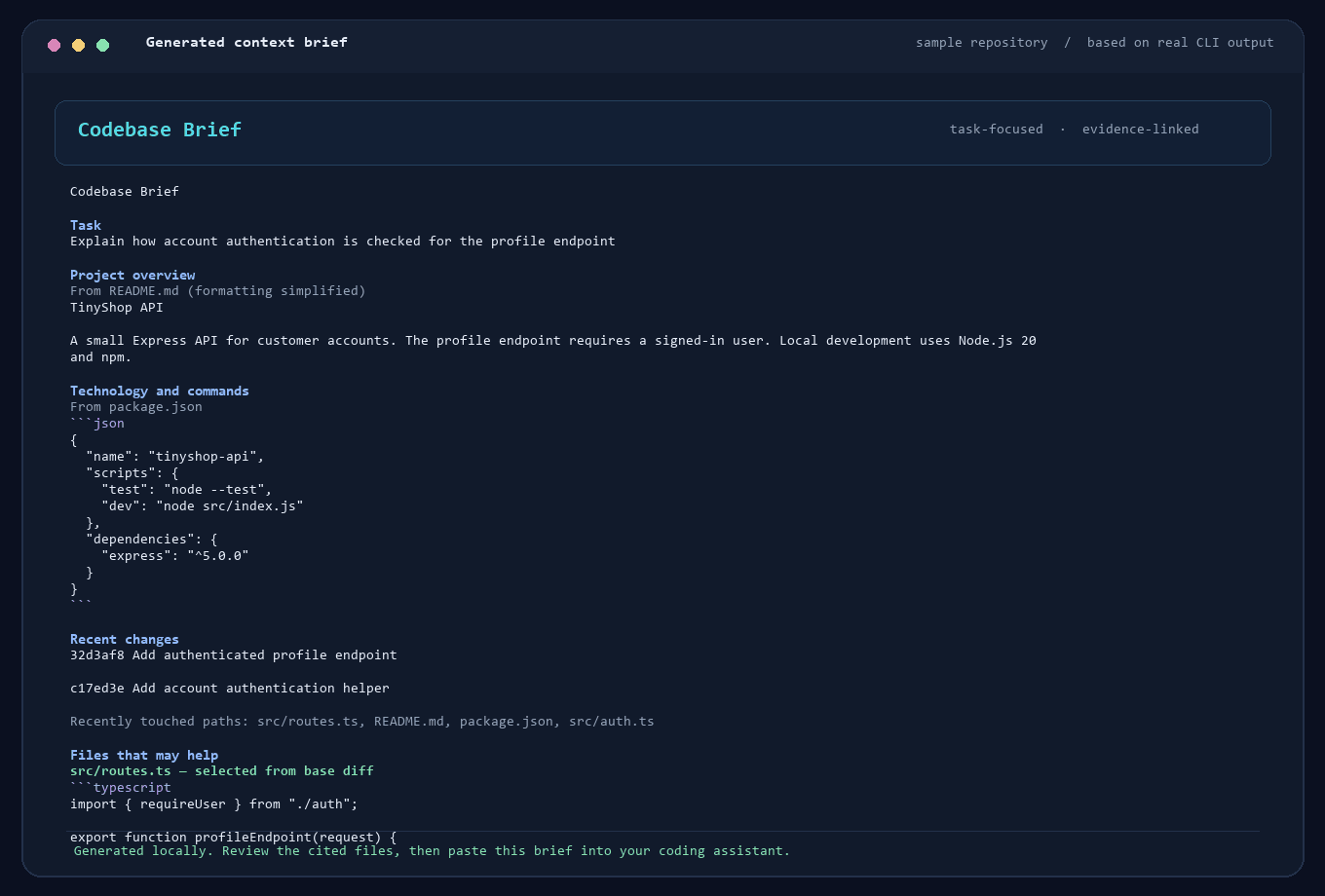
Codebase Brief reads your local project, suggests files for the task, and prepares a short brief with excerpts and paths. Review what it picked, then paste it into a coding chat that cannot access your repo—or use it when you want to choose exactly what context to share.
Open source · Python 3.10+ · runs locally · no AI account or upload
New to pipx? Use the virtual-environment steps in the README instead.
Want to preview it first? Run brief --demo; it uses a temporary sample project and leaves your files alone.
Already using an assistant with local-folder or GitHub access? Its built-in repo tools may be simpler; see when Codebase Brief fits.
$ pipx install codebase-brief

$ brief
In the menu, choose 1, describe your task, review the file list, then choose 4 to copy the brief.
It gathers a useful starting point. You review the file suggestions before anything goes to your assistant.
For example: “Find where login errors are handled.” Git history can help prioritize recent changes.
See why each file was suggested. Keep, remove, or add files before building the brief.
Give your chat a compact, reviewed starting point for the task. If it already has repo access, you may not need this step.
The brief is compact and source-linked, so you can verify the context instead of trusting a mystery score.
Then share what you kept, removed, or added—and whether the brief helped your assistant.